1. Introduction
FM1-Model is an open-source firmware for the M-VAVE FM-1 groovebox, released under the GPL-3.0. It turns the FM-1 into a six-track groovebox with a step sequencer, parameter locks, trig conditions, presets, kits, MIDI and USB audio. Its workflow is inspired by Elektron's Model:Cycles and Model:Samples: the functions of those machines, reached with the controls the FM-1 has.
Two flavors
FM1-Model comes in two flavors. They share everything except the sound engine: the sequencer, the panel, the screen, presets and kits, the effects, MIDI, USB and the flash storage. Only one flavor is installed at a time. Each one keeps its own project in flash, so you can switch between them without losing anything.
| FM1-Model FM | FM1-Model PCM | |
|---|---|---|
| Inspired by | Model:Cycles | Model:Samples |
| Sound | six FM machines: KICK, SNARE, METAL, PERC, TONE, CHORD | a sample player: one sample per track, from 35 factory samples or your own |
| Main knob row | PITCH DECAY COLOR SHAPE | PITCH DECAY START LEN |
| Second row (ENV) | SWEEP CNTOUR DELAY REVERB | CUTOFF RESO DELAY REVERB |
| Black keys 10 and 11 | PUNCH, GATE | LOOP, REVERSE |
| ALGORITHM | the track's machine | the track's sample (WAVE) |
| PITCH | 3/8 of a semitone per step on the percussion machines; semitones, shown as a note, on TONE and CHORD | semitones on every track, shown as +/- (up to 24) |
| Factory presets and kits | 22 presets, 4 kits | 15 presets, 3 kits |
| Project in flash | P1 | P2 |
| Splash line | SIX FM MACHINES | ONE SAMPLE PER TRACK |
| Package | fm1_model_fm.fwsc | fm1_model_pcm.fwsc |
In this manual, a FM or PCM badge marks what belongs to one flavor only; BOTH marks what is the same on both. Everything without a badge is shared.
What the FM-1 has
- 14 buttons: FX SCL ENV LFO EDIT GLO HOME SAVE ARP SEQ PLAY REC OCT- OCT+.
- 7 encoders: SELECT, ALGORITHM, PRESETS and KNOB 1 to KNOB 4, plus the MASTER volume.
- 27 keys: 16 white and 11 black, with lights.
- A 240 x 240 color screen, a built-in speaker, a headphone output and a battery.
- USB (MIDI in and out, audio to the computer, firmware updates) and a TRS MIDI input.
Status and disclaimer
FM1-Model is an independent project. It is not affiliated with or endorsed by M-VAVE or Elektron. It is free software with no warranty: you install it at your own risk.
This is an early version (v0.1 on the splash screen). Much of it has been built and tested in a simulation on a computer; some parts have had little time on a real FM-1. Chapter 21 lists what is still missing.
2. Installing and updating
Installing a package
A firmware comes as a package file: fm1_model_fm.fwsc for FM1-Model FM or fm1_model_pcm.fwsc for
FM1-Model PCM. You install it over USB with the installer from Felucca, the project FM1-Model is built on.
- Get a checkout of the FM1-Model repository and the package you want (build it, or take it from a release).
- Install Python 3 with the
midoandpython-rtmidipackages. - Switch the FM-1 on and connect it to the computer with a USB cable.
- From the root of the checkout, run:
python third_party/felucca/tools/fm1_install.py <package>.fwsc - Confirm. The FM-1 writes the package and restarts, and the installer checks that the new firmware answers. The installed
identity is
FM-1_980for FM andFM-1_982for PCM.
Useful options: --port NAME picks the MIDI port when there is more than one, --yes skips the
confirmation, and --info prints the identity of the connected FM-1 without installing anything.
Do not unplug the USB cable or switch the FM-1 off while the package is being written. If an install is cut off anyway, run the same command again: when the FM-1 is still in update mode, the installer finishes the write.
PCM The sample loader page can also install FM1-Model PCM, with your own samples, from Chrome or Edge (see the web sample loader).
Switching flavors
To switch, install the other package the same way. FM1-Model FM keeps its project in the flash area P1 and FM1-Model PCM in P2; neither flavor reads, writes or erases the other's. When you come back, your patterns, presets and kits are where you left them. The MIDI and metronome settings are shared by both flavors.
The resets in the STARTUP menu are the exception: EMPTY RESET erases the patterns of both projects, and FACTORY RESET erases everything both flavors have saved. See chapter 16.
Returning to the official firmware
The same installer puts back the official firmware: run it with M-VAVE's unmodified official file FM-1.fwsc
(version V15) instead of an FM1-Model package. The official file is not part of FM1-Model; you have to obtain it yourself.
If the FM-1 does not respond to the installer, there is a recovery route through the chip's own boot loader, UBOOT:
- Hold OCT- + OCT+ for 5 seconds: the screen says
UBOOTand the FM-1 waits for a recovery tool. - After two failed boots in a row, the firmware goes to UBOOT by itself instead of starting.
The UBOOT recovery uses third-party tools on Windows and writes the flash directly. Read tools/README.md in the
repository before you try it, and follow it exactly.
The boot screen
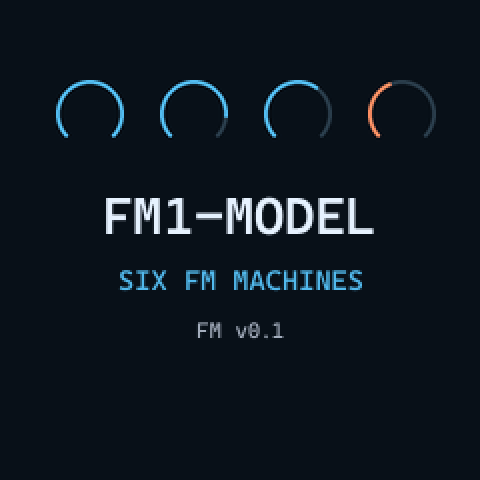
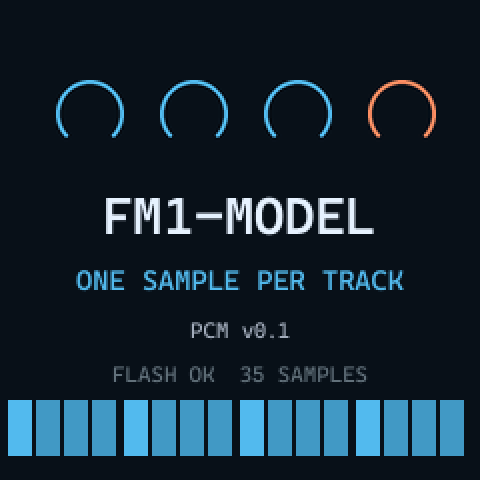
At power on, four rings sweep up, the name FM1-MODEL appears with the flavor's line and version, and a pattern runs
along the sixteen trig boxes. The last line is the result of a check the firmware makes of its own image in flash.
| Last line | Meaning |
|---|---|
FLASH OK | The firmware image reads back correctly. FM |
FLASH OK N SAMPLES | PCM The image is correct and its sample ROM holds N samples (35 for the factory set, or what the sample loader wrote). |
FLASH OK NO SAMPLES | PCM The sample ROM is missing or invalid: every track is silent. Reinstall a good package. |
FLASH BAD and numbers | Parts of the image (the numbers are 64 KiB chunks) read back wrong, so the firmware cannot be trusted. The line stays for 4 seconds. Reinstall the package. |
3. The panel
FM1-Model gives each FM-1 control a role from the Model machines. The most important one: EDIT is FUNC, the modifier that gives most controls their second function. In this manual, EDIT + SAVE means: hold EDIT, then press SAVE. "Tap" means a short press; "held" means keep it down while you do the next thing.
Buttons
| Button | Role | Alone | Combinations |
|---|---|---|---|
| EDIT | FUNC | a modifier: hold it | held at power on: the STARTUP menu |
| PLAY | PLAY | play, pause, resume | EDIT + PLAY: clear the pattern (the track in GRID RECORDING); a held trig, page or TRACK + PLAY: clear that |
| REC | RECORD | tap: GRID RECORDING on / off | REC held + PLAY: LIVE RECORDING; EDIT + REC: copy |
| HOME | STOP | stop; twice quickly: also cut the effect tails | EDIT + HOME: paste |
| SEQ | PATTERN | held + keys: choose pattern, bank, chain | EDIT + SEQ: temporary reload; held 1 s: RELOAD; SEQ + TRACK: PROJECT menu |
| SAVE | SETTINGS | tap: the MIDI settings | EDIT + SAVE: temporary save; held 1 s: save to flash; SEQ + SAVE: rename the pattern |
| ARP | BACK | tap: revert the last change | held + a knob: remove that parameter's locks from the track |
| ENV | knob row | switch the knobs to the second row and back | |
| LFO | LFO | tap: the LFO row on the knobs | held + a knob: assign the LFO to that parameter |
| SCL | SCALE | the SCALE menu on the knobs | |
| FX | FX knobs | held: the knobs are the delay and reverb settings | |
| GLO | TEMPO | held + SELECT: tempo | EDIT + GLO: tap tempo |
| OCT- OCT+ | octave, NO / YES | the keyboard's octave; in menus OCT+ is YES and OCT- is NO or exit | a held trig + OCT: micro timing; both held 5 s: UBOOT |
The button GLO in the top row is TEMPO. Do not confuse it with the black key printed GLO, which is TRACK.
Encoders and MASTER
| Control | Role | What it does |
|---|---|---|
| KNOB 1 to KNOB 4 | track parameters | a row of four parameters at a time (main row, ENV row, LFO row, or a menu); with EDIT held: LFO SPD, VOL+DIST, SWING, CHANCE; under a held trig: parameter locks |
| SELECT | LEVEL/DATA | the track's level; EDIT + SELECT: pan; under a held trig: NOTE (with EDIT: VEL); in menus: move |
| ALGORITHM | MACHINES / WAVE | FM the track's machine, PCM the track's sample; under a held trig: a machine or sample lock; EDIT + ALGORITHM: the PRESET menu |
| PRESETS | presets | opens and scrolls the PRESET menu; under a held trig: the trig's LEN |
| MASTER | MAIN VOLUME | the speaker and headphone volume (not the USB audio) |
Keys
The 16 white keys (F3 to G5) are the trig keys TRIG 1 to TRIG 16. In GRID RECORDING they set the trigs of the page; otherwise they are a chromatic keyboard. The 11 black keys, counted from the left, have these roles (their printed labels belong to the official firmware):
| Black key | Printed label | Role | What it does |
|---|---|---|---|
| 1 to 6 | OP1 to OP6 | T1 to T6 | the track pads: select the track and play it; EDIT + pad: mute; SEQ + pad: choose bank A to F |
| 7 | PIT | PAGE | tap: next page; held while playing: FILL; + TRIG n: track length |
| 8 | GLO | TRACK | + pad: select without playing; + knob: CONTROL ALL; + PAGE: latch FILL; EDIT + TRACK: TRACK SETUP |
| 9 | MONO | RETRIG | + pad or key: retrig; held trig + RETRIG: TRIG REPEAT; EDIT + RETRIG: RETRIG SETUP |
| 10 | POLY | FM PUNCH / PCM LOOP | toggles the switch; held trig + key: lock it; EDIT + key: QUANTIZE menu |
| 11 | (none) | FM GATE / PCM REVERSE | toggles the switch; held trig + key: lock it; EDIT + key: CLICK menu (held 1 s: metronome on / off) |
The pads play at a fixed velocity of 100: the FM-1 does not sense how hard you press.
Key lights
| Light | Meaning |
|---|---|
| White key lit | a note trig on that step (selected track, page on the keys) |
| White key blinking quickly | a note trig with parameter or preset locks |
| White key blinking slowly | a lock trig |
| White key of the step playing | the playhead |
| TRIG 9 lit outside recording | the root of the chromatic keyboard |
| With SEQ held | the white keys show the bank's patterns: lit with data, the current one blinks, a queued one blinks fast |
| Black keys | the selected track's pad; PAGE lit outside page 1 and blinking in FILL; keys 10 and 11 lit when their switch is on |
| PLAY REC EDIT | playing, recording (REC blinks in LIVE RECORDING), FUNC held; the other buttons glow dim |
4. The screen
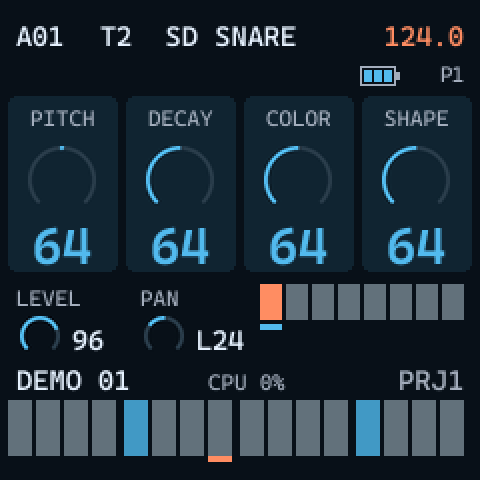
The header
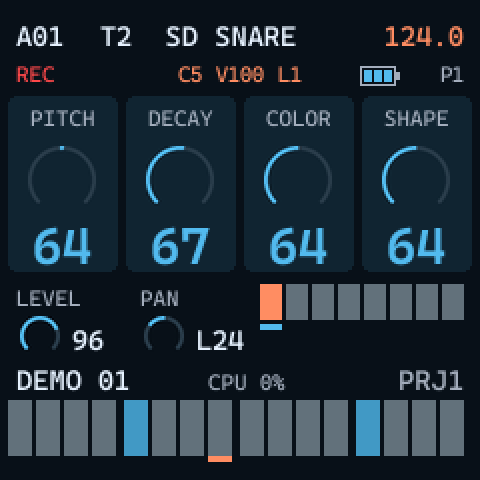
- First row: the pattern position (
A01toF16, in the accent color while another pattern is queued), the track (T1toT6) and its machine (FM) or sample name (PCM), and the tempo, in the accent color while playing. - Second row:
RECin GRID RECORDING,LIVEin LIVE RECORDING, orEXTwhile following an external MIDI clock; then a message, the held trig'sNOTE VEL LEN(for exampleC5 V100 L1, withPadded when it has a preset lock), orFILL; the battery; and the page on the keys (P1toP8).
The knob cards
The four cards show what KNOB 1 to KNOB 4 control right now: the label, a ring and the value. Bipolar
values (PITCH, PAN, LFO depth, CUTOFF on PCM, and others) start the ring at 12 o'clock. Named values such as TRI,
ON or 1/16 show without a ring. With a trig held, the cards show that trig's values, locks included.
The card of the knob you turn shows in the accent color (orange) for about 0.7 seconds, so you can see what you are changing.
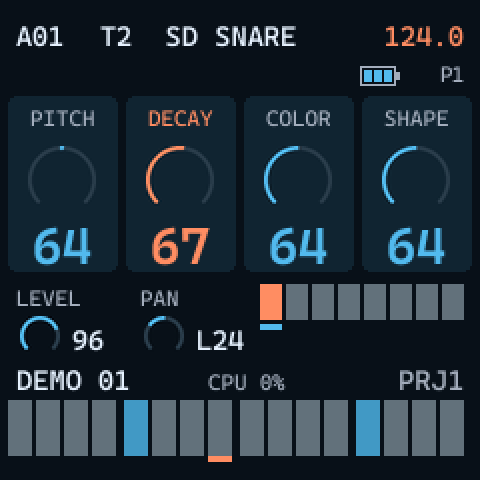
The labels change with the row and with the buttons you hold: EDIT held shows LFO SPD VOL DST SWING CHANCE,
FX held shows the effect settings, and the menus (SCALE, CLICK, QUANTIZE, RETRIG SETUP, TRACK SETUP) use the cards for
their four settings.
Level, pan and the page strip
Under the cards, two small rings show the selected track's LEVEL (0 to 127) and PAN (L64
to R63, C in the middle). To their right, eight boxes stand for the eight pages of 16 steps: the pages the
track's length covers are lighter, the page playing is in the accent color, and a line under a box marks the page on the keys.
The trigs
The bottom row shows the 16 steps of the page on the keys for the selected track. Different shades tell note trigs, note trigs with locks, lock trigs and empty steps apart. While playing, a short accent line under a box is the playhead.
Name, CPU and project
Between the strip and the trigs: the pattern's name (up to eight characters, empty in a new pattern), the CPU meter, and the
working project (PRJ1 on FM, PRJ2 on PCM).
The CPU meter CPU n% shows the longest audio render of the last second as a share of the time available. When a
render took too long, which is an audible dropout, it turns red and adds X n, the number of such dropouts.
Battery
The battery icon has up to three bars. On USB power its outline is in the accent color (charging). With one bar left, that bar is in the accent color.
Messages
Short messages appear in the header's second row for about a second and a half.
| Message | Meaning |
|---|---|
SAVED | the save to flash is done (SAVED U03: a user preset was saved) |
SAVE ERR, LOAD ERR, ERASE ERR | the flash could not be written, read or erased |
BANK FULL | the working pattern does not fit in the pattern memory: nothing was written |
NO FLASH | the flash chip was not found: nothing can be saved |
SAFE BOOT | the last start crashed, so the saved data was not loaded (safe boot) |
COPIED, REVERTED, TAP | a copy, a revert with ARP, a tap tempo tap |
RELOADED, NOT SAVED | RELOAD done, or the slot has nothing saved |
QUANTIZED, CANCELLED | QUANTIZE APPLY confirmed or cancelled |
CLICK ON, CLICK OFF | the metronome switched |
LOADED, KIT LOADED, EMPTY | a preset or kit loaded, or the highlighted slot is empty |
LOCKED, UNLOCKED, LOCKS FULL | a preset lock set or removed, or the pattern has 64 locked presets already |
USER FULL, KIT FULL, FACTORY | no free user slot; a factory preset or kit cannot be renamed |
RENAMED, ABORTED, DELETED | results of the NAMING menu and of deleting |
PRESETS, KITS, LOCKS | the list shown in the PRESET menu |
PROJECT, WORKING, NEW | the PROJECT menu opened, an action running, an empty project loaded |
5. Patterns and banks
The sequencer is the same on both flavors BOTH. A pattern holds six tracks, each with its own sound, length, scale, swing and chance, plus the tempo, the effect settings and a name.
96 patterns in six banks
There are 96 patterns, in six banks A to F of 16 patterns each: A01 to F16. The header shows the
position of the working pattern. When you change pattern, the one you leave is kept in its slot in memory; to keep the patterns
after power off, save to flash.
Selecting a pattern
- Hold SEQ. The white keys now show the bank's 16 patterns: lit when the slot has data, blinking for the current one.
- To change bank, press a pad: T1 is bank A, T6 is bank F.
- Press TRIG n to choose pattern n of that bank.
Changing pattern while playing
While the sequencer runs, the new pattern is queued: it starts when the current one ends (or after the CHG length set in the SCALE menu), with no gap. Meanwhile its position shows in the header in the accent color and its key blinks fast while SEQ is held. A MIDI program change does the same (program change).
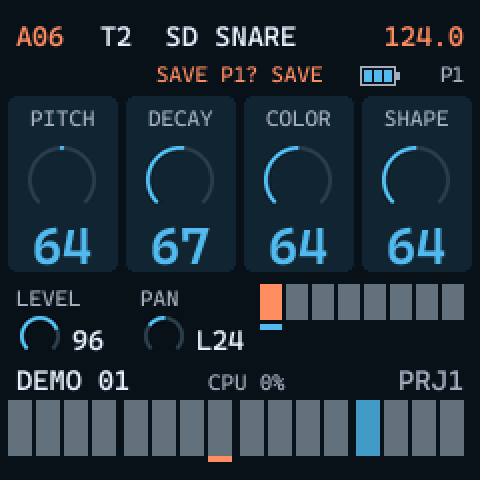
Chains
Hold SEQ, keep the first pattern's TRIG key down and press more keys: the patterns play one after another in that order. A chain holds up to 64 patterns. Choosing another pattern ends the chain.
Pattern names
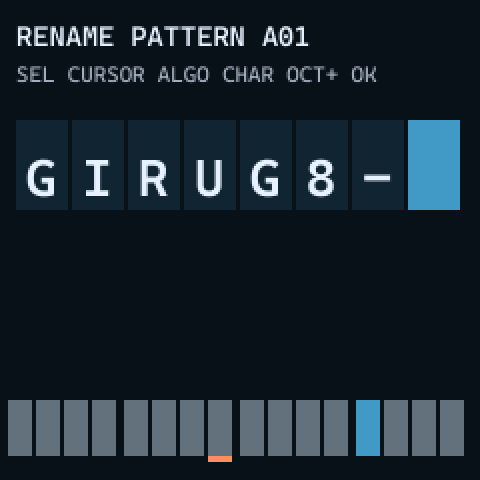
Besides its position, a pattern has a name of up to eight characters, shown under the page strip. Press SEQ + SAVE to rename the working pattern with the NAMING menu. The name travels with the pattern when you copy it and is saved with it. To rename a pattern in another slot, select it first.
6. Playing and recording
Play, pause and stop
| Gesture | What happens |
|---|---|
| PLAY | starts; pressed while playing, pauses (the sound stops); pressed again, resumes |
| HOME | stops and goes back to step 1. The voices fade out in about 50 ms; the delay and reverb tails keep ringing until they die out |
| HOME twice (within 0.5 s) | also silences the delay and reverb tails |
Tempo and tap tempo
- Hold GLO and turn SELECT: the tempo in steps of 1 BPM. Hold GLO, then also EDIT, and turn SELECT: steps of 0.1 BPM. The range is 30.0 to 300.0 BPM.
- EDIT + GLO, tapped in time: tap tempo. From the fourth tap on, the tempo is the average of the taps and keeps updating with each tap; a pause of 2 seconds starts over.
The tempo is part of the pattern. While the sequencer follows an external MIDI clock, the header shows the external tempo and
EXT.
Grid recording
Tap REC to enter GRID RECORDING (REC on the screen, REC lit); tap it again to leave. In GRID
RECORDING the white keys are the 16 steps of the page shown for the selected track:
- Tap a key to set a note trig; tap it again to remove it.
- Choose the track with its pad (it plays) or with TRACK + pad (silent).
- Tap PAGE for the next page.
- TRACK + SELECT shifts every trig of the track one step per click, with their locks, within the track length.
Live recording
Hold REC and press PLAY: LIVE RECORDING starts (LIVE on the screen) and the sequencer plays.
Now:
- the pads and the white keys record notes on the selected track as you play them;
- a knob you turn records a parameter lock on the step that is playing (a lock trig if the step was empty);
- MIDI notes and CCs that arrive are recorded the same way;
- PLAY leaves LIVE RECORDING and keeps playing.
Press PLAY twice while holding REC to switch the live quantize on or off. With quantize on, notes land on the nearest step. With it off, a note also lands on the nearest step but keeps its offset as micro timing (-23 to +23 ticks).
The QUANTIZE menu
EDIT + PUNCH (black key 10, LOOP on PCM) puts the QUANTIZE menu on the knobs; the same gesture leaves it. It moves the micro timing of recorded trigs toward the grid.
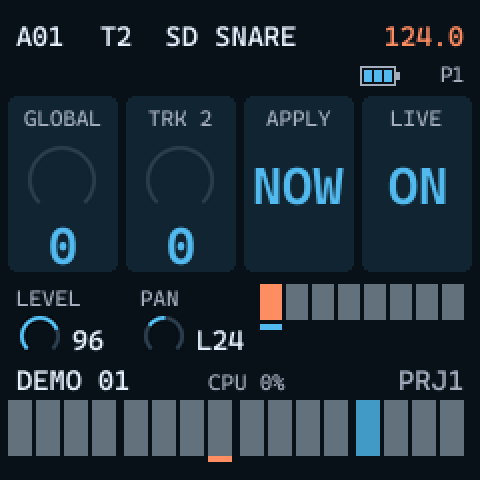
| Knob | Card | Setting |
|---|---|---|
| KNOB 1 | GLOBAL | quantize amount for every track, 0 to 127 |
| KNOB 2 | TRK n | the selected track's amount, 0 to 127, added to GLOBAL (at most 127) |
| KNOB 3 | APPLY | the amounts act at once while you listen; turn right (YES?), then OCT+ makes it permanent or OCT- cancels |
| KNOB 4 | LIVE | the LIVE RECORDING quantize, ON or OFF |
The metronome
EDIT + GATE (black key 11, REVERSE on PCM), tapped, opens the CLICK menu; the same gesture leaves it. Held for one second, the same gesture switches the metronome on or off without opening the menu. The metronome settings are saved to flash and shared by both flavors.
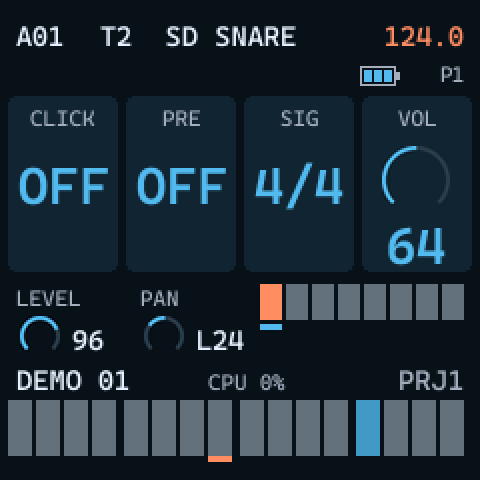
| Knob | Card | Setting |
|---|---|---|
| KNOB 1 | CLICK | metronome ON or OFF |
| KNOB 2 | PRE | ON: a one-bar count-in when LIVE RECORDING starts |
| KNOB 3 | SIG | time signature: 2/4, 3/4, 4/4, 5/4, 6/4, 7/4, 3/8, 5/8, 6/8, 7/8, 9/8, 12/8 |
| KNOB 4 | VOL | volume, 0 to 127 |
7. Trigs and locks
Note trigs
In GRID RECORDING, a short tap on a white key sets or removes a note trig: the step plays the track's sound. Held longer than about 0.3 seconds, or with a knob turned while it is down, the key does not toggle the trig: it selects the trig for editing, and its values show on the cards and in the header.
Lock trigs
EDIT + a white key (in GRID RECORDING) sets a lock trig: a step that plays no note and carries only parameter locks. A tap on a lock trig turns it into a note trig. On the keys, a lock trig blinks slowly.
Several trigs at once
Hold several white keys together and they are edited as one selection: knobs (locks), NOTE, VEL, LEN, micro timing, the trig condition, TRIG REPEAT, machine, sample and preset locks, the black key switches, and copy, paste and clear. Each trig keeps its own value and moves by the same amount. The screen shows the first key pressed. Pressing keys together never toggles them.
Parameter locks
A parameter lock gives one step its own value for a parameter. Hold a trig and turn a knob: the value you set applies on that step only, and the card shows it while the trig is held. This works on every knob row (main, ENV, EDIT row, LFO row). A note trig with locks blinks quickly on its key.
- Hold a trig and press PUNCH / GATE (on PCM LOOP / REVERSE) to lock that switch on the step; the same again removes the lock.
- Hold a trig and turn ALGORITHM: a machine lock on FM, a sample lock on PCM. The step plays with another machine or sample.
- Hold a trig and use EDIT + ALGORITHM: a preset lock.
- In LIVE RECORDING, turning a knob records locks on the step playing.
Removing locks
| To remove | Gesture |
|---|---|
| one lock of a trig | hold the trig, turn that knob, press PLAY |
| a machine or sample lock | hold the trig, turn ALGORITHM, press PLAY |
| a trig's NOTE, VEL and LEN | hold the trig, turn SELECT or PRESETS, press PLAY: back to C5, 100 and the default length |
| a preset lock | right after setting it, while you still hold the trig, press PLAY; or in the PRESET menu, OCT+ on the locked preset |
| the whole trig with its locks | hold the trig and press PLAY without turning anything |
| one parameter's locks on the whole track | hold ARP and turn that parameter's knob |
ARP + knob removes all the locks of that parameter at once (on the Model machines it acts while the pattern plays, step by step).
Trig note, velocity and length
| Hold a trig and | Sets | Range |
|---|---|---|
| turn SELECT | NOTE | C0 to G10 (MIDI 0 to 127; C5 is 60) |
| EDIT + turn SELECT | VEL | velocity |
| turn PRESETS | LEN | 0.125 to 128 steps, or INF |
The header shows them as C5 V100 L1. In GRID RECORDING, a MIDI note received while you hold a trig sets its NOTE
and VEL. FM LEN is where a GATE note ends, and the length of the MIDI note sent with MOUT.
PCM LEN only sets the length of the MIDI note sent; the sample is not affected.
Trig conditions
In GRID RECORDING, hold a trig and turn EDIT + KNOB 4: the fourth card becomes COND and sets
the trig's condition, which decides whether the trig plays on a given pass.
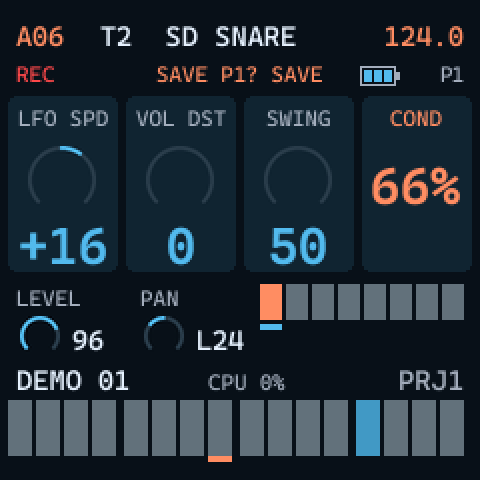
| Condition | The trig plays |
|---|---|
OFF | always |
10% 25% 33% 50% 66% 75% 90% | with that probability |
A:B (1:2 to 8:8) | on pass A of every B passes of the pattern; all 35 combinations with B from 2 to 8. For example 4:7 plays on passes 4, 11, 18 and so on |
FILL / !FILL | only in FILL / only outside FILL |
PRE / !PRE | when the track's previous trig played / did not play |
NEI / !NEI | when the last trig of the neighbor track (the track before it; for T1, T6) played / did not play |
1ST / !1ST | only on the track's first pass / on every pass but the first |
Each track also has a CHANCE setting, EDIT + KNOB 4 without a held trig (see swing and chance).
Micro timing
Hold a trig and press OCT- or OCT+: TRIG NUDGE moves it earlier or later by one tick per press, from -23 to +23 ticks (a step is 24 ticks). A negative value really plays before its step.
Retrigs and trig repeat
TRIG REPEAT on a trig
Hold one or more trigs and press RETRIG: the knobs become the TRIG REPEAT menu for those trigs. Pressing RETRIG again switches the repeat on or off. Letting go of the trigs closes the menu.
| Knob | Card | Setting |
|---|---|---|
| KNOB 1 | RETRIG | ON or OFF |
| KNOB 2 | RTE | rate: 1/1, 1/2, 1/3, 1/4, 1/5, 1/6, 1/8, 1/10, 1/12, 1/16, 1/20, 1/24, 1/32, 1/40, 1/48, 1/64, 1/80 |
| KNOB 3 | LEN | how long the repeats last, 0.125 to 128 steps or INF (until the next trig) |
| KNOB 4 | FDE | fade of the repeats' velocity, negative fades out, positive fades in |
Live retrig and RETRIG SETUP
Hold RETRIG and play a pad or a white key: the track retrigs while you hold it, even with the transport stopped. In LIVE RECORDING this records one trig with TRIG REPEAT. EDIT + RETRIG opens RETRIG SETUP, the track's settings for it (saved with the pattern):
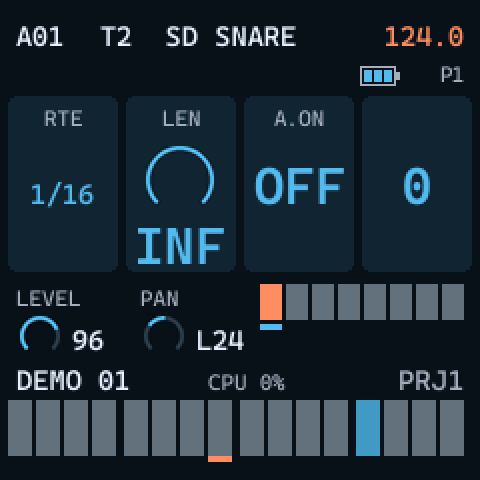
| Knob | Card | Setting |
|---|---|---|
| KNOB 1 | RTE | rate, 1/1 to 1/80 as above |
| KNOB 2 | LEN | 0.125 to 128 steps, or INF: the retrig goes on while the pad is held |
| KNOB 3 | A.ON | ON: the pads and keys of this track always retrig, without holding RETRIG |
8. Tracks and pages
Selecting and playing tracks
Press a pad T1 to T6 to select that track and hear it; TRACK + pad selects it without playing. A pad plays the note set as PAD in TRACK SETUP (C5 by default), at velocity 100.
Outside GRID RECORDING the white keys are a chromatic keyboard for the selected track: TRIG 9 (lit) is the root, C5. OCT- and OCT+ move the keyboard up to three octaves down or up, and KBT in TRACK SETUP transposes one track's keyboard.
Track length and pages
Each track has its own length, from 1 to 128 steps: up to eight pages of 16 (the Model machines go up to 64).
- PAGE + TRIG n sets the length to step n of the page on the keys.
- In the SCALE menu, LEN sets any length up to 128.
- A tap on PAGE moves the keys to the next page, cycling through the pages the longest track covers.
- When you lengthen a track, the new steps get a copy of its loop. A series of changes made within two seconds of each other keeps copying the loop you started from.
The SCALE menu
SCL puts the SCALE menu on the knobs; SCL again leaves it.
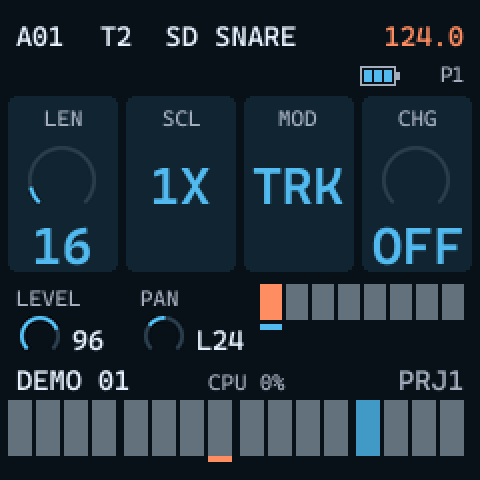
| Knob | Card | Setting |
|---|---|---|
| KNOB 1 | LEN | the track's length, 1 to 128 steps |
| KNOB 2 | SCL | the track's speed: 1/8X, 1/4X, 1/2X, 3/4X, 1X, 3/2X, 2X |
| KNOB 3 | MOD | TRK: each track has its own LEN and SCL; PAT: all tracks share them |
| KNOB 4 | CHG | after how many steps a queued pattern starts, 1 to 128; OFF: at the end of the pattern (with TRK, the end of the longest track) |
Swing and chance
With EDIT held, KNOB 3 is the track's SWING (50 to 80) and KNOB 4 its CHANCE (0 to 100, the probability that its trigs play). They belong to the pattern, not to the sound, so presets and kits do not change them.
Fill
While playing (outside GRID RECORDING), hold PAGE: FILL mode lasts while you hold it. TRACK
+ PAGE latches FILL on or off. The header shows FILL and the PAGE key blinks. Trigs with the
conditions FILL and !FILL depend on it.
Mute
EDIT + a pad mutes or unmutes that track.
Control all
Hold TRACK and turn a knob: the parameter changes by the same amount on all six tracks.
TRACK SETUP
EDIT + TRACK opens TRACK SETUP for the selected track; the same gesture leaves it.
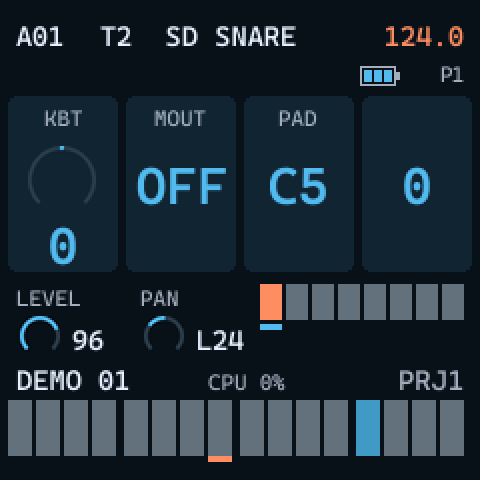
| Knob | Card | Setting |
|---|---|---|
| KNOB 1 | KBT | keyboard transposition of this track, -60 to +60 semitones (incoming MIDI notes are not affected) |
| KNOB 2 | MOUT | ON: the track's notes are sent as MIDI (also in the MIDI menu) |
| KNOB 3 | PAD | the note the pad plays, records and sends, C0 to G10 (also set by CC 3) |
9. Editing tools
Copy, paste and clear
The same three buttons copy, paste and clear: REC copies, HOME pastes, PLAY clears. What they act on depends on what you hold. The clipboard holds one thing at a time.
| Target | Hold | Copy / paste / clear |
|---|---|---|
| the working pattern (outside GRID RECORDING) | EDIT | REC / HOME / PLAY; clear removes the sequence only |
| the selected track (in GRID RECORDING) | EDIT | REC / HOME / PLAY |
| a page (in GRID RECORDING) | PAGE | REC / HOME / PLAY |
| one or more trigs with their locks (in GRID RECORDING) | the trig keys | REC / HOME / PLAY; several trigs paste relative to the first key held |
| the track's sound | TRACK | REC / HOME / PLAY; clear returns the default sound and keeps the machine; TRACK + EDIT + PLAY clears all six sounds |
| a pattern slot, without leaving the working pattern | SEQ + TRIG n | REC / HOME / PLAY; clearing the working pattern's own slot empties it completely (sequence, sounds and settings; the tempo stays) |
Trigs, pages and tracks pasted into another pattern bring their preset locks with them.
Undo
A paste or a clear is undone by repeating the same gesture on the same target. There is one level of undo; a different paste or clear replaces it.
Temporary save and reload
| Gesture | What happens |
|---|---|
| EDIT + SAVE (tap) | a temporary copy of the working pattern is kept in memory |
| EDIT + SEQ (tap) | the working pattern goes back to the temporary copy |
| EDIT + SEQ held 1 s | RELOAD: the pattern as it was last stored in its slot (by a pattern change or a save to flash); the position playing stays. NOT SAVED if the slot is empty |
The temporary save lives in memory only. To keep your work after power off, hold EDIT + SAVE for one second (saving to flash).
Revert with ARP
A tap on ARP puts back the last parameter change, if it was less than three seconds ago: a knob, CONTROL ALL, level,
pan, the FX knobs, or locks while their trig is still held. The screen says REVERTED. There is one level.
10. FM1-Model FM
FM FM1-Model FM has six FM machines of up to four operators, inspired by the Model:Cycles. Each track plays one machine, one voice at a time. ALGORITHM chooses the track's machine; the header shows its name.
The six machines
| Machine | On screen | How it is made |
|---|---|---|
| KICK | BD KICK | a sine body with a pitch sweep and an FM transient |
| SNARE | SD SNARE | a two-operator inharmonic body plus filtered noise |
| METAL | MT METAL | four operators in an FM chain, from bells to hi-hats |
| PERC | PC PERC | two-operator FM with a pitch sweep: toms, congas, zaps |
| TONE | TN TONE | two-operator FM for basses, keys and leads |
| CHORD | CH CHORD | the four operators as voices of a chord or a unison |
A new, empty project puts KICK, SNARE, METAL, PERC, TONE and CHORD on tracks 1 to 6.
The knobs per machine
PITCH and DECAY (the amplifier's decay) work the same on every machine. COLOR and SHAPE (main row) and SWEEP and CONTOUR (ENV row) depend on the machine:
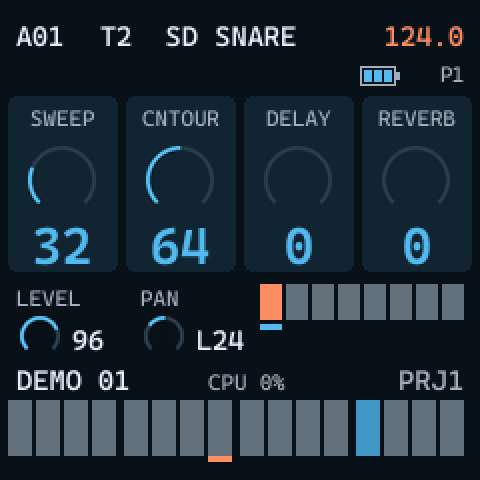
| Machine | COLOR | SHAPE | SWEEP | CONTOUR |
|---|---|---|---|---|
| KICK | transient harmonics (its FM depth) | transient length | pitch sweep depth | body: a hold before the decay, punchy to round |
| SNARE | body harmonics | body / noise balance | body pitch sweep | noise decay, snappy to washy |
| METAL | harmonic (bell) to inharmonic (hi-hat) ratios | FM depth (noisiness) | pitch sweep | high-pass, dark to bright |
| PERC | modulator ratio | FM depth | pitch sweep | FM envelope time |
| TONE | FM depth | modulator ratio | extra FM that decays, pluck to flat | modulator feedback, sine to saw-like |
| CHORD | interval mix (chords) or detune (unisons) | the chord, from the list below | "wavetable": a sine with feedback | low-pass filter envelope depth |
The CHORD mapping follows the Model:Cycles manual. For the other five machines the mapping follows the character described there, as closely as a four-operator FM voice allows; it is not an exact copy. The sound has not been compared with the original hardware.
PITCH, and PITCH as a note
PITCH is bipolar: 64 is the machine's own pitch and the range is 24 semitones down or up.
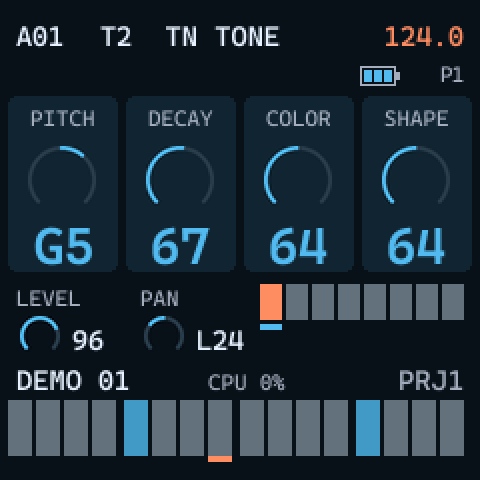
- On KICK, SNARE, METAL and PERC, one step of the knob is 3/8 of a semitone and the card shows the number.
- On TONE and CHORD, one step is a whole semitone and the card shows the note: C5 in the middle, G5 at +7. With a trig held, the note is counted from that trig's NOTE. This makes chords easy to play by name.
The CHORD list
On the CHORD machine, SHAPE picks one of 37 chords and unisons, in this order (appendix C of the Model:Cycles manual). The table gives the SHAPE value where each one starts and its intervals in semitones from the root. On the unisons, COLOR detunes the voices.
| SHAPE | Chord | Semitones | SHAPE | Chord | Semitones |
|---|---|---|---|---|---|
| 0 | Unison x2 | 0 0 | 66 | m7b5 | 0 3 6 10 |
| 4 | Unison x3 | 0 0 0 | 70 | M7b5 | 0 4 6 10 |
| 7 | Unison x4 | 0 0 0 0 | 73 | M#5 | 0 4 8 |
| 11 | minor | 0 3 7 | 77 | m7#5 | 0 3 8 10 |
| 14 | Major | 0 4 7 | 80 | M7#5 | 0 4 8 10 |
| 18 | sus2 | 0 2 7 | 84 | mb6 | 0 3 7 8 |
| 21 | sus4 | 0 5 7 | 87 | m9no5 | 0 3 10 14 |
| 25 | m7 | 0 3 7 10 | 90 | M9no5 | 0 4 10 14 |
| 28 | M7 | 0 4 7 10 | 94 | Madd9b5 | 0 4 6 14 |
| 32 | mMaj7 | 0 3 7 11 | 97 | Maj7b5 | 0 4 6 11 |
| 35 | Maj7 | 0 4 7 11 | 101 | M7b9no5 | 0 4 10 13 |
| 39 | 7sus4 | 0 5 7 10 | 104 | sus4#5b9 | 0 5 8 13 |
| 42 | dim7 | 0 3 6 9 | 108 | sus4add#5 | 0 5 7 8 |
| 45 | madd9 | 0 3 7 14 | 111 | Maddb5 | 0 4 6 7 |
| 49 | Madd9 | 0 4 7 14 | 115 | M6add4no5 | 0 4 5 9 |
| 52 | m6 | 0 3 7 9 | 118 | Maj7/6no5 | 0 4 9 11 |
| 56 | M6 | 0 4 7 9 | 122 | Maj9no5 | 0 4 11 14 |
| 59 | mb5 | 0 3 6 | 125 | Fourths | 0 5 10 15 |
| 63 | Mb5 | 0 4 6 |
VOLUME+DIST, PUNCH and GATE
- VOLUME+DIST (EDIT + KNOB 2,
VOL DSTon the card) drives the voice into a soft clip and raises its level, from x1 to x4. - PUNCH (PUNCH, black key 10) switches extra drive on for the track: at least x2. The key is lit while it is on.
- GATE (GATE, black key 11): ON holds the envelope at its peak until the note ends, when you let go of the key or pad, or after the trig's LEN in the sequencer. OFF (the default): the note-off is ignored and the sound decays by itself.
Both switches can be locked per trig: hold the trig and press the key.
11. FM1-Model PCM
PCM FM1-Model PCM is a sample player inspired by the Model:Samples: each track plays one sample from a ROM inside the firmware, with the same sequencer, presets, effects and MIDI as the FM flavor.
The sample player
Each of the six tracks has one voice. The sound goes through: the sample (from START, for LEN, forward or reversed, once or looped), the low-pass / high-pass filter, VOLUME+DIST, the amplifier with DECAY, then pan and the effect sends. The filter comes before the drive here; on the Model:Samples it comes after.
A new, empty project puts the samples BD 1, SD 1, CH 1, OH 1,
CLAP and PLUCK C2 on tracks 1 to 6.
The knobs
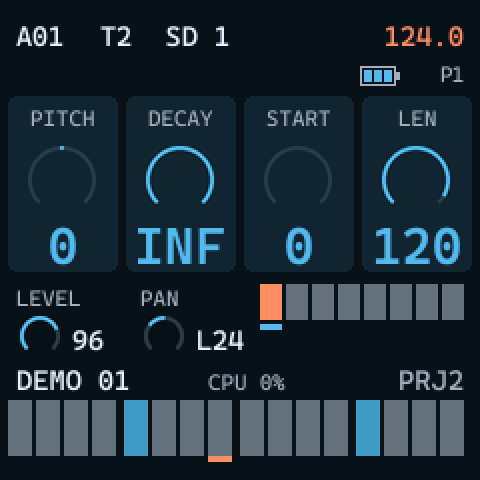
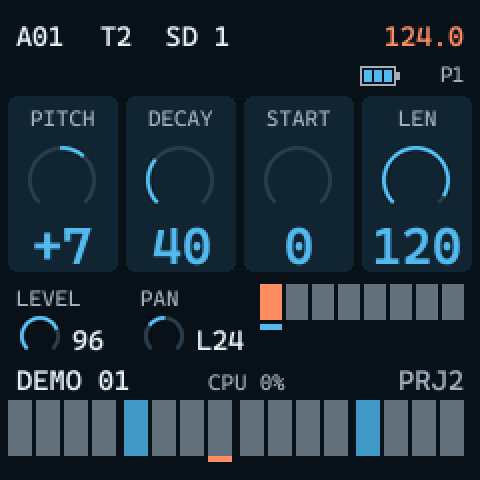
| Control | Card | Range | What it does |
|---|---|---|---|
| KNOB 1 | PITCH | -24 to +24 | semitones; 0 plays the sample at its own pitch (plus the note played, against the sample's root note) |
| KNOB 2 | DECAY | 0 to 126, INF | the amplifier's decay; at the top, INF: no decay, the sample plays to its end, or for ever with LOOP |
| KNOB 3 | START | 0 to 120 | where playback starts, as a share of the sample's length |
| KNOB 4 | LEN | 0 to 120 | how much plays, counted from START; with LOOP, the section that repeats |
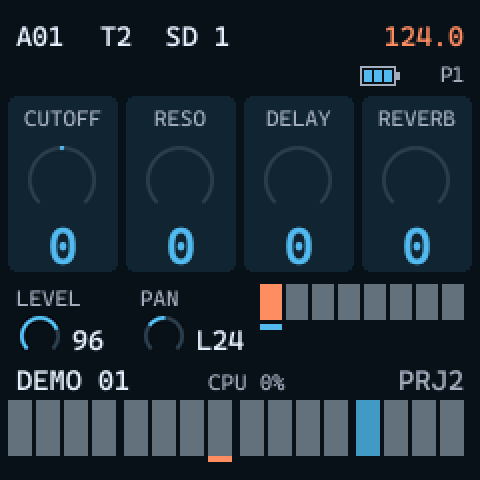
| ENV, KNOB 1 | CUTOFF | -64 to +63 | 0 is open; below 0 a low-pass, above 0 a high-pass |
| ENV, KNOB 2 | RESO | 0 to 127 | the filter's resonance, a peak at the cutoff |
| ENV, KNOB 3, KNOB 4 | DELAY REVERB | 0 to 127 | the effect sends, as on FM |
START is rounded down to the nearest block of 256 frames of the sample.
LOOP and REVERSE
The black keys that are PUNCH and GATE on FM are LOOP and REVERSE on PCM. Each key toggles its switch for the track and is lit while it is on. Hold a trig and press the key to lock the switch on that step; press it again to remove the lock.
- LOOP (black key 10): repeats the section between START and LEN for as long as DECAY lasts; with DECAY at INF, until the next trig.
- REVERSE (black key 11): plays the sample backwards.
PCM has no GATE: a sample plays its course whether you hold the pad or not, and a trig's LEN only affects the MIDI note sent.
Choosing the sample (WAVE)
Turn ALGORITHM to step through the samples of the ROM for the selected track; the header shows the sample's name. Hold a trig in GRID RECORDING and turn ALGORITHM to set a sample lock: that step plays another sample. Hold the trig, turn ALGORITHM and press PLAY to remove it.
On the chromatic keyboard, TRIG 9 plays the sample at its root note, its original pitch.
A track remembers its sample by its position in the ROM. If you load a different set of samples with the sample loader, existing patterns play whatever sample now sits at that position.
The 35 factory samples
The factory ROM holds 35 one-shot samples, 16.7 seconds in total, made from 15 sounds: the others are the same sound played faster or slower, or cut shorter. ALGORITHM steps through them in this order:
| No. | Group | Samples | Source |
|---|---|---|---|
| 1 to 4 | kicks | BD 1 BD 2 BD 3 BD 4 | Felucca |
| 5 to 8 | snares | SD 1 SD 2 SD 3 SD CRACK | Felucca |
| 9 to 10 | claps | CLAP CLAP 2 | Felucca |
| 11 to 12 | rims | RIM RIM 2 | Felucca |
| 13 to 17 | hi-hats | CH 1 CH 2 CH 3 (closed), OH 1 OH 2 (open) | Felucca |
| 18 to 20 | toms | TOM LO TOM MID TOM HI | Felucca |
| 21 to 23 | percussion | COWBELL COWBELL2 CLAVES | Felucca |
| 24 to 26 | cymbals | CRASH CRASH 2 RIDE | Felucca |
| 27 to 29 | plucks | PLUCK C2 PLUCK C3 PLUCK C4 | Felucca |
| 30 to 31 | piano | PIANO C2 PIANO C4 | VCSL (CC0) |
| 32 to 33 | flute | FLUTE C4 FLUTE C5 | VSCO-2 CE (CC0) |
| 34 to 35 | tenor sax | SAX BB2 SAX BB3 | VCSL (CC0) |
The drums and plucks are synthesized by Felucca's tools (some are the same source at another speed); the instruments are short excerpts of CC0 recordings by Versilian Studios. See credits.
The sample ROM
The samples live inside the firmware image, not in the project: saving, loading projects and the STARTUP resets never touch them. The ROM has room for 384 KiB (393216 bytes), about 35 seconds of audio, stored as 4-bit IMA ADPCM, mono, at 22.05 kHz (the output runs at 44.1 kHz). It holds up to 255 samples, each with a name of up to eight characters and a root note. The factory set takes 184 KB.
The web sample loader
To use your own samples, open the sample loader. It runs entirely in the browser:
- Drop the package
fm1_model_pcm.fwsc. Its samples appear as cards; click one to listen. - Drop your audio files (WAV, or anything the browser can decode). Each one is made mono at 22050 Hz, trimmed to its attack,
faded at the end and normalized to -1 dBFS. Give it a name of up to eight characters and a root note (read from names such as
Bass C3, where C3 is MIDI 60). Reorder or remove samples, including the factory ones. A meter shows how much of the ROM is used. - Download the patched
.fwsc, or install it over USB (WebMIDI, in Chrome or Edge). The install rewrites the whole firmware and takes about a minute.
After the install, the boot screen shows FLASH OK and the number of samples. Your projects are not touched.
Do not unplug the USB cable while the loader is installing.
12. The LFO
Each track has one LFO with one destination. Tap LFO to put the LFO row on the knobs; tap it again to leave.
The LFO row
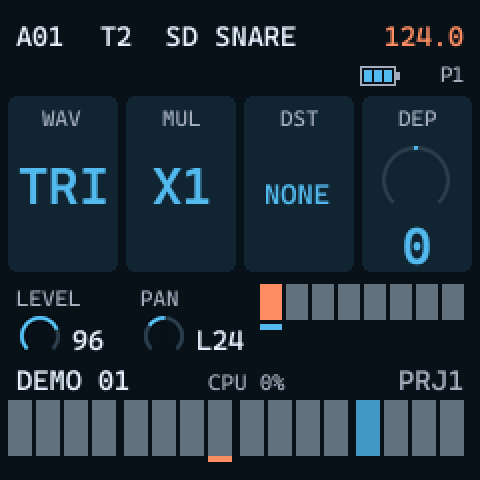
| Knob | Card | Setting |
|---|---|---|
| KNOB 1 | WAV | the waveform: TRI SIN SQR SAW ENV RAMP RND |
| KNOB 2 | MUL | the speed multiplier: X1 to X2K follow the tempo, 1 to 2K are fixed (as at 120 BPM); 24 values |
| KNOB 3 | DST | the destination (table below) |
| KNOB 4 | DEP | the depth, bipolar |
The speed SPD is EDIT + KNOB 1 on the main and ENV rows (LFO SPD), and
EDIT + KNOB 4 in the LFO row. It is bipolar: a negative speed runs the wave backwards. ENV runs
one cycle from each note, then stays.
Destinations
| FM card | Parameter | PCM card | Parameter |
|---|---|---|---|
NONE | no destination | NONE | no destination |
PITCH | pitch | PITCH | pitch |
FINE | fine tune | FINE | fine tune |
DECAY | decay | DECAY | decay |
COLOR | color | START | sample start (read when the note starts) |
SHAPE | shape | LEN | sample length (read when the note starts) |
SWEEP | sweep | FREQ | filter cutoff |
CNTOUR | contour | RESO | resonance |
DELAY | delay send | DELAY | delay send |
REVERB | reverb send | REVERB | reverb send |
VOL+D | VOLUME+DIST | DIST | VOLUME+DIST |
PAN | pan | PAN | pan |
PUNCH | the PUNCH switch | ||
GATE | the GATE switch |
LFO SETUP
In the LFO row, hold EDIT: the knobs become LFO SETUP.
| Knob | Card | Setting |
|---|---|---|
| KNOB 1 | RST | ON: each note restarts the wave at the SPH phase |
| KNOB 2 | FDE | a fade of the LFO from each note: positive fades it out, negative fades it in, 0 is no fade |
| KNOB 3 | SPH | the phase a restart begins at (64 is the middle of the cycle) |
| KNOB 4 | SPD | the speed |
RST, FDE and SPH cannot be locked per trig; the other LFO settings can.
Assigning the LFO with a knob
Hold LFO and turn the knob of a parameter: the first turn makes that parameter the LFO's destination, the next turns set the depth. Under a held trig, the destination and depth become locks of that step. This works for every knob whose parameter is a destination.
13. Effects
There are two effects shared by all tracks: a ping-pong delay and a reverb. The master output ends in a soft-clip limiter. Their settings belong to the pattern.
Sends
Each track sends to the effects with DELAY and REVERB, KNOB 3 and KNOB 4 of the
ENV row (0 to 127). The sends can be locked per trig and modulated by the LFO.
The FX knobs
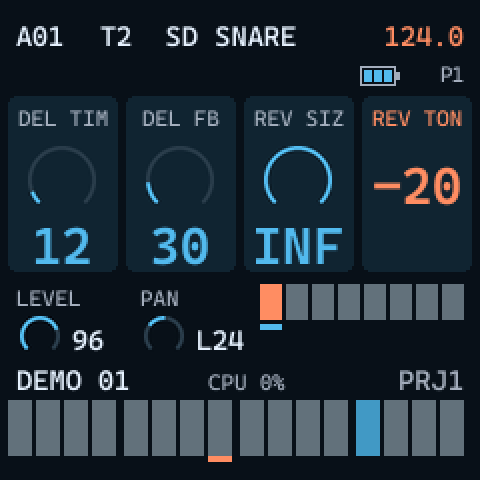
Hold FX: the knobs set the effects themselves.
| Knob | Card | Range | What it does |
|---|---|---|---|
| KNOB 1 | DEL TIM | 1 to 128 | delay time in 128th notes (1/32 of a quarter note), following the tempo |
| KNOB 2 | DEL FB | 0 to 198 | delay feedback |
| KNOB 3 | REV SIZ | 1 to 127, INF | reverb size; INF holds the reverb |
| KNOB 4 | REV TON | -64 to +63 | reverb tone: below 0 darker, above 0 fewer lows |
The delay line is at most 1.98 seconds long, so below about 120 BPM the highest TIME values are cut to that. HOME twice silences both tails.
Level, pan and drive
- SELECT: the track's level, 0 to 127.
- EDIT + SELECT: the track's pan.
- EDIT + KNOB 2: VOLUME+DIST, per-voice drive into a soft clip.
- MASTER: the speaker and headphone volume.
14. Presets and kits
A preset is a track's sound: its machine (FM) or sample (PCM) and its sound parameters, everything except SWING and CHANCE, which belong to the pattern. A kit is six sounds, one per track, with a name. Loading a preset or kit copies it: later changes to the track do not change the preset.
The library
| FM | PCM | |
|---|---|---|
| Factory presets | 22 | 15 |
| User preset slots | 32 | 32 |
| Factory kits | 4 | 3 |
| User kit slots | 16 | 16 |
| Preset locks per pattern | 64 | 64 |
| Factory | FM | PCM |
|---|---|---|
| Presets | BD PUNCH BD ROUND BD 808 SD CRACK SD FAT SD RIM
HH CLOSE HH OPEN CYMBAL BELL TOM LOW TOM HIGH CONGA
ZAP FM BASS E PIANO PLUCK SAW LEAD MIN7 PAD MAJ STAB
SUS PAD UNISON |
KICK KICK LOW SNARE SNR TITE CLAP RIM HAT CLSD
HAT OPEN TOM COWBELL RIDE PLUCK PIANO FLUTE SAX |
| Kits | PUNCHY SOFT 808 ACID | BASIC TIGHT LOUNGE |
The PRESET menu
Open it with EDIT + ALGORITHM, or by turning PRESETS. The list holds the factory presets first,
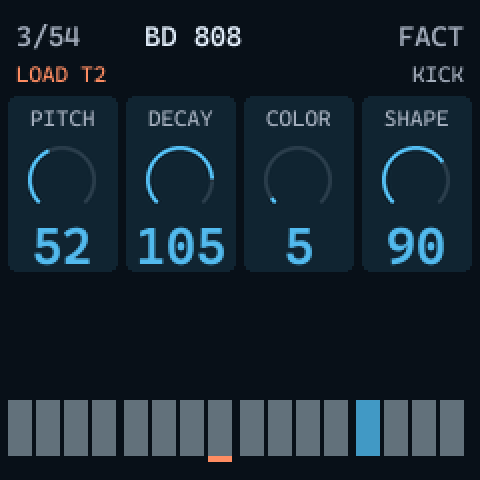
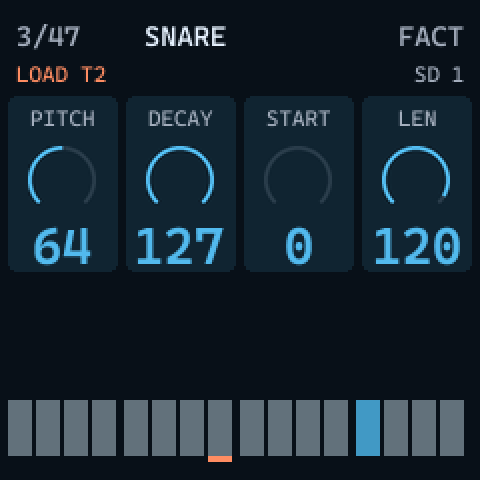
then the 32 user slots. The header shows the position in the list, the name, FACT or USER, the track it
loads to and the machine or sample; the cards show the preset's main values.
| In the PRESET menu | Does |
|---|---|
| ALGORITHM, SELECT or PRESETS | move through the list |
| a white key or a pad | audition the highlighted preset on the selected track (a pad selects its track), without loading it |
| OCT+ | load it onto the selected track |
| OCT- | leave without loading |
| SAVE | save the track's sound into the highlighted user slot, or into the first free one when a factory preset is highlighted; the NAMING menu opens |
| EDIT + SAVE | rename the highlighted user preset |
| EDIT + PLAY | delete the highlighted user preset |
| HOME | switch the list: presets, then kits, then the pattern's LOCKS (when it has any), then presets again |
| PLAY | start and stop the sequencer, to hear the preset in the pattern |
User presets and kits are written to flash as soon as you save, rename or delete them. A user preset saved with an empty name
gets one from its slot and machine, such as U03 KICK; factory presets cannot be renamed or deleted.
Kits
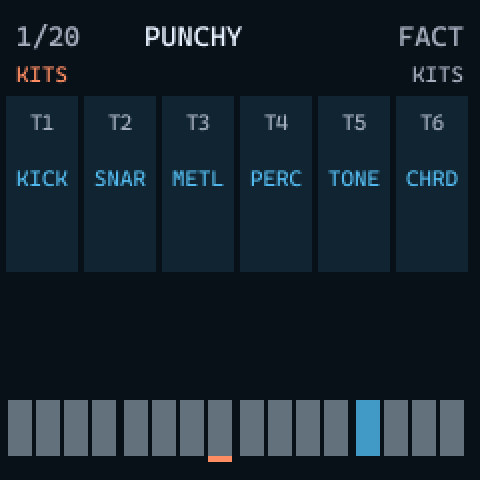
Press HOME in the PRESET menu to see the kits: factory kits first, then the 16 user slots. The cells show each track's sound.
| In the kit list | Does |
|---|---|
| a pad | plays that track's sound of the kit |
| a white key | plays the selected track's sound of the kit |
| OCT+ | loads the six sounds onto the six tracks (LOAD FOLDER) |
| SAVE | saves the six tracks' sounds as a kit (SAVE KIT), through the NAMING menu; an empty name becomes KIT 03 and so on |
| EDIT + SAVE / EDIT + PLAY | rename / delete the highlighted user kit |
Preset locks
A preset lock makes one step play another preset: its machine or sample and its sound, with the step's own parameter locks on top. The next step returns to the track's sound.
- In GRID RECORDING, hold one or more trigs.
- Press EDIT + ALGORITHM: the PRESET menu opens for the lock.
- Choose a preset and press OCT+:
LOCKED. On a trig that already has a lock, the menu opens on that preset, and OCT+ on it removes the lock (UNLOCKED).
The header shows P after the held trig's note when it has a preset lock.
The LOCKS folder
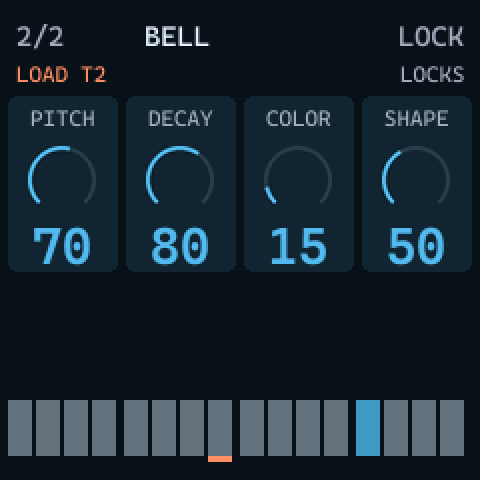
Each pattern keeps the presets its trigs lock in a table of up to 64, without duplicates; presets no trig uses any more are
dropped. In the PRESET menu, HOME after the kits shows this table as LOCKS, and OCT+ loads one
of them onto the selected track. When the table is full, the screen says LOCKS FULL.
The NAMING menu
Saving a preset or kit, renaming one, and renaming a pattern (SEQ + SAVE) open the NAMING menu: eight
characters, from space, A to Z, 0 to 9 and - + # . (upper case only).
| Gesture | Does |
|---|---|
| SELECT | move the cursor |
| ALGORITHM, or EDIT + SELECT | change the character at the cursor |
| EDIT + ARP | delete the character before the cursor |
| EDIT + REC / HOME / PLAY | copy / paste / clear the name; repeating a paste or clear undoes it |
| OCT+ | save under this name |
| OCT- or ARP | abort |
15. Projects and saving
Saving to flash
Hold EDIT + SAVE for one second. The firmware writes the 96 patterns, the user presets and kits and the
last pattern you chose to the flash; the screen says SAVED. At the next power on they come back, with the same
pattern selected.
- Only the parts that changed are rewritten. The audio is muted for a moment while flash sectors are erased.
- Each object is written in a pair of sectors with a commit record written last, so a power cut during a save leaves the previous copy intact.
- If the working pattern does not fit in the pattern memory (possible with a huge number of trigs and locks over 128 steps), the
save refuses with
BANK FULLand writes nothing.
Patterns are not saved automatically. Everything since the last held EDIT + SAVE is lost when the FM-1 is switched off or its battery runs out.
| What | Written to flash when |
|---|---|
| patterns (and the last pattern chosen) | EDIT + SAVE held 1 s, or SAVE in the PROJECT menu |
| user presets and kits | at once, when you save, rename or delete one in the PRESET menu (also with the held save) |
| MIDI settings | when you leave the MIDI menu |
| metronome and MOUT | when you leave the CLICK or TRACK SETUP menu, or switch the metronome with EDIT + GATE held |
The PROJECT menu
A project is the whole set: the 96 patterns, the user presets and the user kits. SEQ + TRACK
opens the PROJECT menu. Each flavor has one project, so the menu shows only P1 on FM and only P2 on PCM, marked
USED or EMPTY, and WORKING for the one in use.
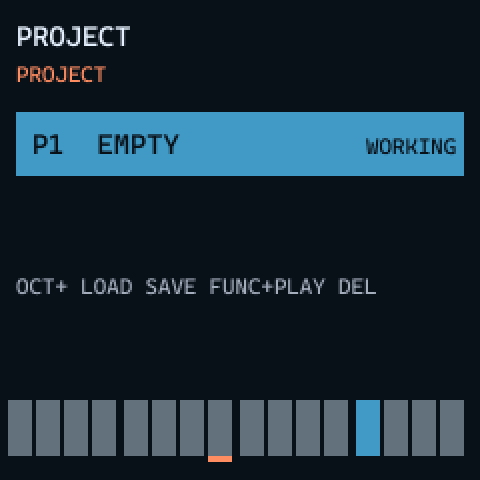
| Press twice (within 4 s) | Does |
|---|---|
| OCT+ | LOAD: brings the stored project in, replacing what is in memory, and stops the sequencer. Loading an empty project starts a new one (NEW) |
| SAVE | SAVE: writes the work in memory to the project |
| EDIT + PLAY | DELETE: erases the project from flash |
The first press asks (for example SAVE P1? SAVE); the second does it. HOME, OCT- or
ARP close the menu.
LOAD does not save the work in memory first: unsaved changes are replaced by the stored project. DELETE cannot be undone.
One project per flavor, shared settings
FM1-Model FM uses the project P1 and FM1-Model PCM the project P2; installing one flavor never touches the other's project. A separate settings object is shared by both: the MIDI settings, the metronome, the working project, and the last pattern and tempo of each project. Patterns of one flavor are not read by the other.
16. The STARTUP menu and safe boot
The STARTUP menu
Hold EDIT while you switch the FM-1 on: the STARTUP menu appears. It runs before the saved data is read, so it works even when that data is damaged.
| Key | Choice | What it does |
|---|---|---|
| TRIG 1 | EXIT | start normally |
| TRIG 2 | EMPTY RESET | erases all patterns of both projects; presets, kits and settings stay |
| TRIG 3 | FACTORY RESET | erases everything the firmware saves: patterns, user presets, user kits and settings |
| TRIG 4 | PANEL TEST | shows the buttons, keys and encoders as the firmware reads them; hold OCT- + OCT+ for 2 s to exit |
| TRIG 5 | STRESS TEST | starts the heaviest pattern the voices can be asked to play, to read the CPU meter; nothing is saved |
Each reset asks first (ERASE ALL PATTERNS? or ERASE EVERYTHING?): OCT+ is yes,
OCT- or TRIG 1 is no.
The resets act on both flavors at once: an EMPTY RESET from FM1-Model FM also erases the patterns of FM1-Model PCM, and the other way round. The PCM samples are part of the firmware image and are not erased.
Safe boot
If the previous start crashed or hung within its first 30 seconds, the next start does not read the saved data: it begins with
an empty project and shows SAFE BOOT. The data stays in flash, untouched. If the start fails twice in a row, the
FM-1 goes to UBOOT instead, so it can be reinstalled (see recovery).
In safe boot, do not save: a save writes the empty state over your stored data. Switch off and on again to try a normal start.
17. MIDI settings
The MIDI menu
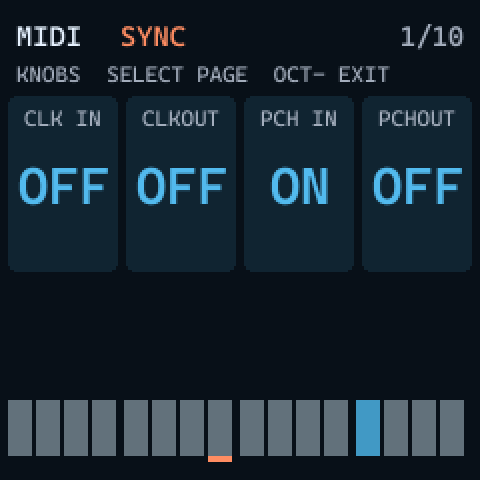
Tap SAVE to open SETTINGS > MIDI. It has 10 pages of up to four settings. KNOB 1 to KNOB 4 change the four settings of the page; SELECT, ALGORITHM or PRESETS change the page; OCT-, SAVE or ARP leave the menu, and the settings are saved to flash. The transport keeps working while the menu is open.
The pages
| Page | KNOB 1 | KNOB 2 | KNOB 3 | KNOB 4 |
|---|---|---|---|---|
SYNC | CLK IN OFF | CLKOUT OFF | PCH IN ON | PCHOUT OFF |
IN CHAN 1/3 | T1 IN 1 | T2 IN 2 | T3 IN 3 | T4 IN 4 |
IN CHAN 2/3 | T5 IN 5 | T6 IN 6 | FX IN 8 | AUTO IN 7 |
IN CHAN 3/3 | PCH IN AUTO | |||
OUT CHAN 1/2 | T1 OUT 1 | T2 OUT 2 | T3 OUT 3 | T4 OUT 4 |
OUT CHAN 2/2 | T5 OUT 5 | T6 OUT 6 | FX OUT 8 | PCHOUT 7 |
PORTS | INP FROM M+U | OUT TO USB | ||
FILTER | RCV NOTE ON | RCV CC ON | ENCS I+E | |
MOUT 1/2 | MOUT T1 OFF | MOUT T2 OFF | MOUT T3 OFF | MOUT T4 OFF |
MOUT 2/2 | MOUT T5 OFF | MOUT T6 OFF |
The values shown are the defaults. Channels are 1 to 16 or OFF; the PCH IN channel can also be AUTO (the AUTO channel).
| Setting | Values and meaning |
|---|---|
CLK IN / CLKOUT | follow an external MIDI clock / send the clock |
PCH IN / PCHOUT (SYNC) | receive / send program changes |
T1 IN to T6 IN | the channel each track listens on |
AUTO IN | a channel that plays whichever track is selected |
FX IN / FX OUT | the channel of the delay and reverb CCs |
INP FROM | which inputs are heard: OFF, MID (the TRS MIDI input), USB, M+U (both) |
OUT TO | OFF or USB (the FM-1 has no MIDI output jack) |
RCV NOTE / RCV CC | accept incoming notes / CCs |
ENCS | INT: the panel controls only the FM-1; I+E: they also send MIDI |
MOUT T1 to MOUT T6 | send the track's notes (also in TRACK SETUP) |
18. MIDI in and out
MIDI goes in through USB and the TRS input, and out through USB only. On the computer, the FM-1 appears as a USB MIDI device named "Felucca".
Notes
- Notes 0 to 5 trigger tracks T1 to T6, on any channel that is listening.
- Notes 12 to 60 play a track chromatically: on a track's IN channel, that track; on the AUTO channel, the selected track.
- With GATE on (FM), the note-off releases the sound.
- LIVE RECORDING records incoming notes with their velocity; in GRID RECORDING, a note received while you hold a trig sets its NOTE and VEL.
MIDI out (MOUT and ENCS)
- With MOUT on for a track, its sequencer trigs are sent as notes on the track's OUT channel, with their velocity and a note-off after exactly LEN steps (INF: until the next trig or the stop). The pads and chromatic keys of that track send notes too.
- Notes received on the AUTO channel are passed on to the selected track's output.
- With ENCS at I+E, the knobs, the pads, mutes and the FX knobs send their CCs.
Control change
Both flavors receive and send 30 CCs: 26 for each track (on its channel) and 4 for the effects (on the FX channel). In LIVE RECORDING, an incoming CC records a lock on the step playing. The numbers follow appendix A of the Model:Cycles and Model:Samples manuals; CC 70 for the sample on PCM is FM1-Model's own.
| FM parameter | CC | PCM parameter | CC |
|---|---|---|---|
| NOTE (the pad note) | 3 | NOTE (the pad note) | 3 |
| MUTE | 94 | MUTE | 94 |
| LEVEL | 95 | LEVEL | 95 |
| PAN | 10 | PAN | 10 |
| PITCH | 65 | PITCH | 16 |
| DECAY | 80 | DECAY | 80 |
| COLOR | 16 | START | 19 |
| SHAPE | 17 | LENGTH | 20 |
| SWEEP | 18 | CUTOFF | 74 |
| CONTOUR | 19 | RESO | 71 |
| DELAY send | 12 | DELAY send | 12 |
| REVERB send | 13 | REVERB send | 13 |
| VOL+DIST | 7 | VOL+DIST | 7 |
| SWING | 15 | SWING | 15 |
| CHANCE | 14 | CHANCE | 14 |
| MACHINE | 70 | SAMPLE | 70 |
| PUNCH | 66 | LOOP | 17 |
| GATE | 67 | REVERSE | 18 |
| LFO SPD | 102 | LFO SPD | 102 |
| LFO MUL | 103 | LFO MUL | 103 |
| LFO FDE | 104 | LFO FDE | 104 |
| LFO DST | 105 | LFO DST | 105 |
| LFO WAV | 106 | LFO WAV | 106 |
| LFO SPH | 107 | LFO SPH | 107 |
| LFO RST | 108 | LFO RST | 108 |
| LFO DEP | 109 | LFO DEP | 109 |
| DELAY TIME (FX channel) | 85 | DELAY TIME (FX channel) | 85 |
| DELAY FEEDBACK (FX channel) | 86 | DELAY FEEDBACK (FX channel) | 86 |
| REVERB SIZE (FX channel) | 87 | REVERB SIZE (FX channel) | 87 |
| REVERB TONE (FX channel) | 88 | REVERB TONE (FX channel) | 88 |
- Switches (MUTE, PUNCH, GATE, LOOP, REVERSE, LFO RST): 64 and above is ON.
- MACHINE (FM) divides 0 to 127 into six equal ranges; SAMPLE (PCM) spreads 0 to 127 over the samples in the ROM.
- SWING maps 0 to 127 onto 50 to 80, CHANCE onto 0 to 100; LFO MUL, DST and WAV are spread over their choices.
- PCM DECAY 127 is INF.
Clock and transport
- CLK IN: the sequencer follows an external clock (24 pulses per quarter note) with Start, Continue and Stop. The
tempo is measured from the pulses and shown in the header with
EXT; the LFO follows it too. If the pulses stop for half a second, the sequencer stops. - CLKOUT: the FM-1 sends 24 pulses per quarter note and Start, Continue and Stop.
- Song Position Pointer is not supported.
Program change
With PCH IN on, program changes 0 to 95 select patterns A01 to F16. They arrive on the PCH IN channel (AUTO by default: the AUTO channel). While playing, the new pattern starts when the current one ends. With PCHOUT on, pattern changes you make are sent as program changes on the PCHOUT channel (7 by default); a change that came in over MIDI is not echoed back.
19. USB audio
Over the same USB cable as MIDI, the FM-1 appears on the computer as a class-compliant audio input (UAC1), stereo, 16 bit at 44.1 kHz: you can record it straight into a DAW, with no driver. The USB audio carries the full mix at full level, before MASTER, which only sets the speaker and headphone volume. It works in one direction only: the FM-1 sends audio to the computer but does not receive any.
20. Limits and specifications
| Item | Value |
|---|---|
| Tracks | 6, one voice each (on FM's CHORD machine, that voice plays up to four notes) |
| Steps per track | 1 to 128, in up to 8 pages of 16 |
| Patterns | 96 (6 banks A to F of 16), chains of up to 64 |
| Sequencer resolution | 96 pulses per quarter note; micro timing -23 to +23 ticks of a 24-tick step |
| Tempo | 30.0 to 300.0 BPM |
| Trig length | 0.125 to 128 steps, or INF |
| Presets | FM: 22 factory, PCM: 15 factory; 32 user slots |
| Kits | FM: 4 factory, PCM: 3 factory; 16 user slots |
| Preset locks | 64 different presets per pattern |
| Names | 8 characters, upper case |
| Audio output | 44.1 kHz stereo (speaker, headphones and USB audio at 16 bit) |
| Delay line | up to 1.98 s |
| PCM sample ROM | 22.05 kHz mono 4-bit IMA ADPCM, up to 384 KiB (about 35 s) and 255 samples; factory set: 35 samples, 16.7 s, 184 KB |
| Flash | the two projects share the FM-1's data area in pairs of sectors with a commit record: P1 for FM, P2 for PCM, plus a shared settings object |
| Firmware identity | FM-1_980 FM, FM-1_982 PCM |
| Screen | 240 x 240, color |
21. What is not there yet
This is the honest list of what the Model machines do and FM1-Model does not, or does only in part.
Both flavors
- Only one project per flavor, without a name (the Model machines have many named projects).
- No SysEx dump of projects or patterns, no SEND AS SYSEX for presets, no nested preset folders.
- No NRPN: parameters are received and sent as CCs only.
- No MIDI output through the TRS jack: the FM-1 has only a MIDI input there.
- No pad velocity, PAD/VEL menu or velocity modulation: the FM-1's pads do not sense velocity.
- No value jumps with EDIT + knob: EDIT + knob is already each knob's second function.
- No AUDIO settings (headphone limit, internal output).
- No panel calibration: the panel uses a fixed table (the PANEL TEST in the STARTUP menu shows what the firmware reads).
- ARP + knob removes a parameter's locks all at once, not step by step while the pattern plays.
- No Song Position Pointer with the external clock.
- USB audio goes from the FM-1 to the computer only.
- The six FM machines and the effects are original designs; they have not been compared with the original hardware.
FM1-Model PCM
- No SAMPLE ASSIGN menu with folders, auditioning of samples or LOAD WHOLE DIR: ALGORITHM steps through the samples directly.
- No SWING ALL menu.
- The trig NOTE and KBT ranges are those of FM (C0 to G10, -60 to +60), not the Model:Samples ranges.
- No lower case in the NAMING menu.
- The LFO has no LOOP and FLIP destinations.
- No live sample upload: new samples mean reinstalling the package with the sample loader. Samples cannot be deleted on the device.
- No DEVICE menu (USB mode, screen, lights).
- No mark on the screen for a sample lock.
- Copying sample locks between patterns is not finished.
22. Troubleshooting
| Symptom | What to do |
|---|---|
| No sound | Turn up MASTER and the track's level (SELECT). Check that the track is not muted (EDIT + pad). On PCM, check that DECAY, LEN and CUTOFF are not closing the sound. |
PCM: every track silent, splash says NO SAMPLES | The sample ROM is invalid. Reinstall the factory package or a package from the sample loader. |
Splash says FLASH BAD | The firmware image reads back wrong. Reinstall the package. |
SAFE BOOT after power on | The last start crashed. Do not save. Switch off and on again; if it keeps crashing with your data, the STARTUP menu's resets erase it (the data is lost). |
Save says BANK FULL | The working pattern is too large to store. Remove some trigs or locks, or shorten long tracks, and save again. Nothing was written. |
USER FULL, KIT FULL, LOCKS FULL | Delete a user preset or kit (EDIT + PLAY in the PRESET menu), or use fewer locked presets in the pattern. |
| The pattern does not change at once | While playing, a new pattern waits for the end of the current one, or for CHG in the SCALE menu. |
| The knobs do something unexpected | A menu may be on the knobs (SCALE, CLICK, QUANTIZE, RETRIG SETUP, TRACK SETUP, LFO): read the cards and press the same button again to leave. |
| The sequencer will not start or stops by itself | CLK IN may be on: it then follows an external clock and stops when the pulses stop. Switch it off in the MIDI menu, page SYNC. |
The CPU meter is red with X n | The audio could not keep up. Use fewer fast retrigs or a lighter pattern. |
| A button or key does not respond | Check it in the STARTUP menu's PANEL TEST. |
| The installer does not find the FM-1 | Check the USB cable, install mido and python-rtmidi, try --port. If the FM-1 does not respond at all, see recovery. |
| An install was interrupted | Run the same install command again; it finishes the write. |
| The FM-1 stops responding | Switch it off and on. To reinstall from scratch, hold OCT- + OCT+ for 5 seconds to enter UBOOT (see recovery). |
23. Credits and licenses
- FM1-Model is free software under the GNU General Public License version 3 only (GPL-3.0-only), with no warranty.
- It is built on Felucca by Leo Kuroshita (Hügelton Instruments), GPL-3.0: its hardware layer, build chain, installer and update loader. The USB device still names itself "Felucca".
- The screen and this site use Cascadia Mono by Microsoft, under the SIL Open Font License 1.1.
- The PCM factory drums and plucks are generated by Felucca's tools (GPL-3.0). The piano, flute and saxophone samples come from
Versilian Studios (Sam Gossner), VSCO-2 Community Edition and VCSL, released under CC0 1.0 (public domain). The list of every
sample and its source is in
pcm/assets/samples/ATTRIBUTION.txt.
FM1-Model is an independent project, inspired by Elektron's Model:Cycles and Model:Samples. Elektron, Model:Cycles and Model:Samples are trademarks of Elektron Music Machines MAV AB; M-VAVE and FM-1 are trademarks of their owners. FM1-Model is not affiliated with or endorsed by them, and their names are used here only to describe what FM1-Model is inspired by and runs on.